 AppliedIn
Open source, runs on your machine
AppliedIn Find the right jobs. Apply with a tailored résumé.
AppliedIn searches job boards, scores every role against what you want, tailors a truthful résumé for each match, and fills the application in your own Chrome. Open source, and it runs on your machine.
Senior Staff Software Engineer, AI/ML
Snorkel AI, San Francisco
9/10 match with your preferences
- Found in the Cosign network, posted on Greenhouse
- Scored 9 out of 10: agent workflows, LLM evaluation and platform work line up
- Résumé tailored for this role
- Checked against your original: every fact still true
- Filling the form in your own Chrome
- Submitted. The page said “Thank you for applying.”
Search the boards where jobs are posted.
Three ways to search, all starting from your preferences. Every result shows the board its posting lives on, so you always know where you're applying.
Fresh
New roles at the companies you watch, read straight from their boards.
Your watchlist on Greenhouse, Lever, Ashby, Workday and company career sites
Career Ops search
Companies you don't track yet, searched in batches you can stop and continue.
Greenhouse, Lever, Ashby, Workday and iCIMS
Cosign network
About 71,572 open roles, searched by title, city, salary and remote.
The Cosign network, with postings on Ashby, Greenhouse and Workday
Select the roles. Press Apply.
Each role is scored first, and only the ones that clear your bar are tailored and sent, one per company at a time. You're asked only when a form needs an answer it doesn't have. Everything else shows up on one board.
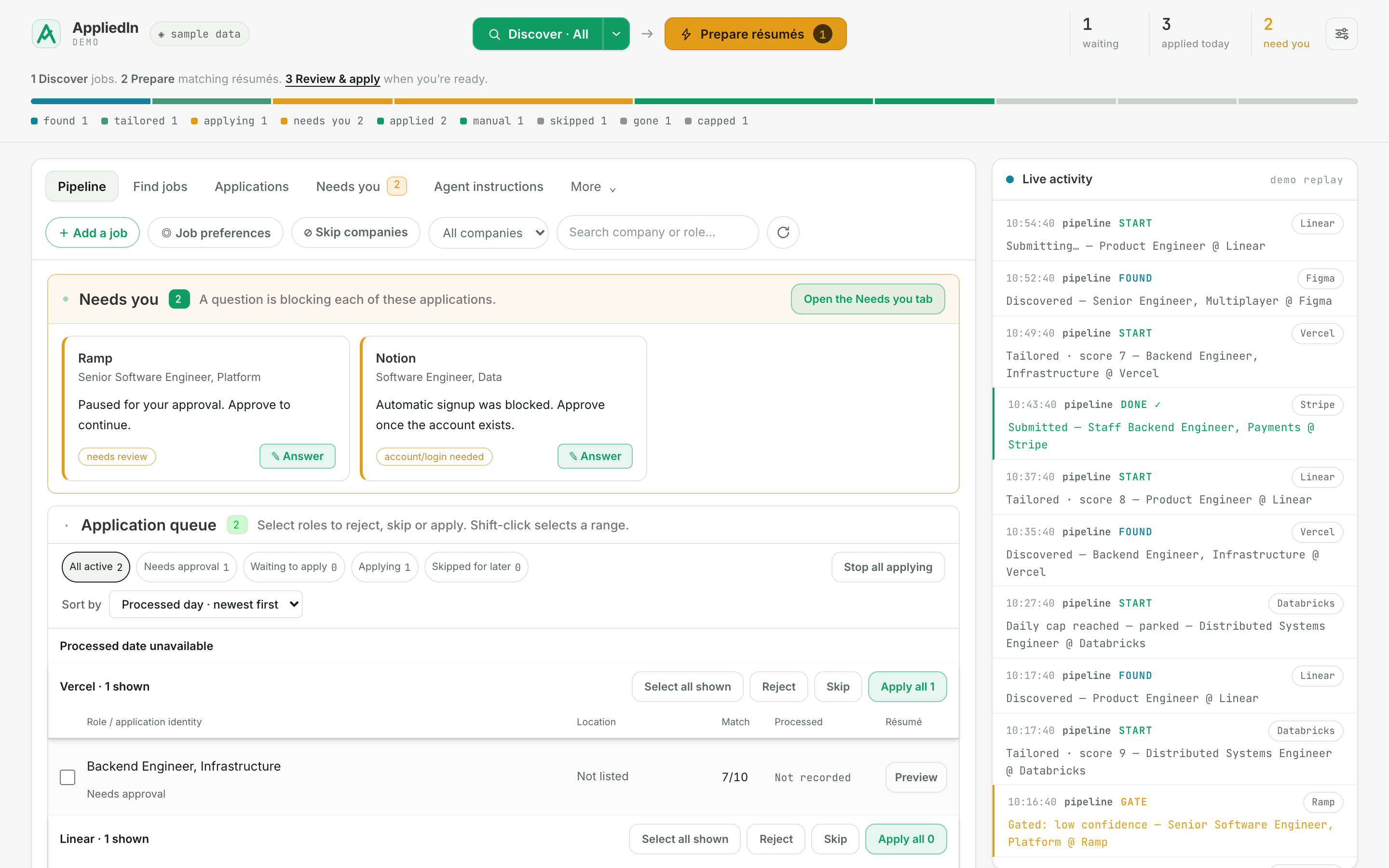
The dashboard on sample data. Open the interactive demo
The rules live in code, not in a prompt.
An application goes out under your name and can't be taken back. These checks run no matter what the model says.
- No invented answersMissing facts, logins and CAPTCHAs come back to you instead of being guessed.
- No unconfirmed “applied”If the confirmation page never appears, the application is marked uncertain, not applied.
- Checks for duplicatesChecked before the browser opens, and again right before submit.
- No rewritten historyThe tailor rewords and reorders. Code checks every fact against your original résumé.
- No declared protected traitsDisability, veteran status, race and gender can be declined, never affirmed.
A graph with clear owners.
Code handles the rules that repeat. Focused agents score roles, tailor the résumé and review the edit. A browser agent fills the form. You keep identity, missing facts and, if you want it, the final say.
Read the talk notes on graph workflows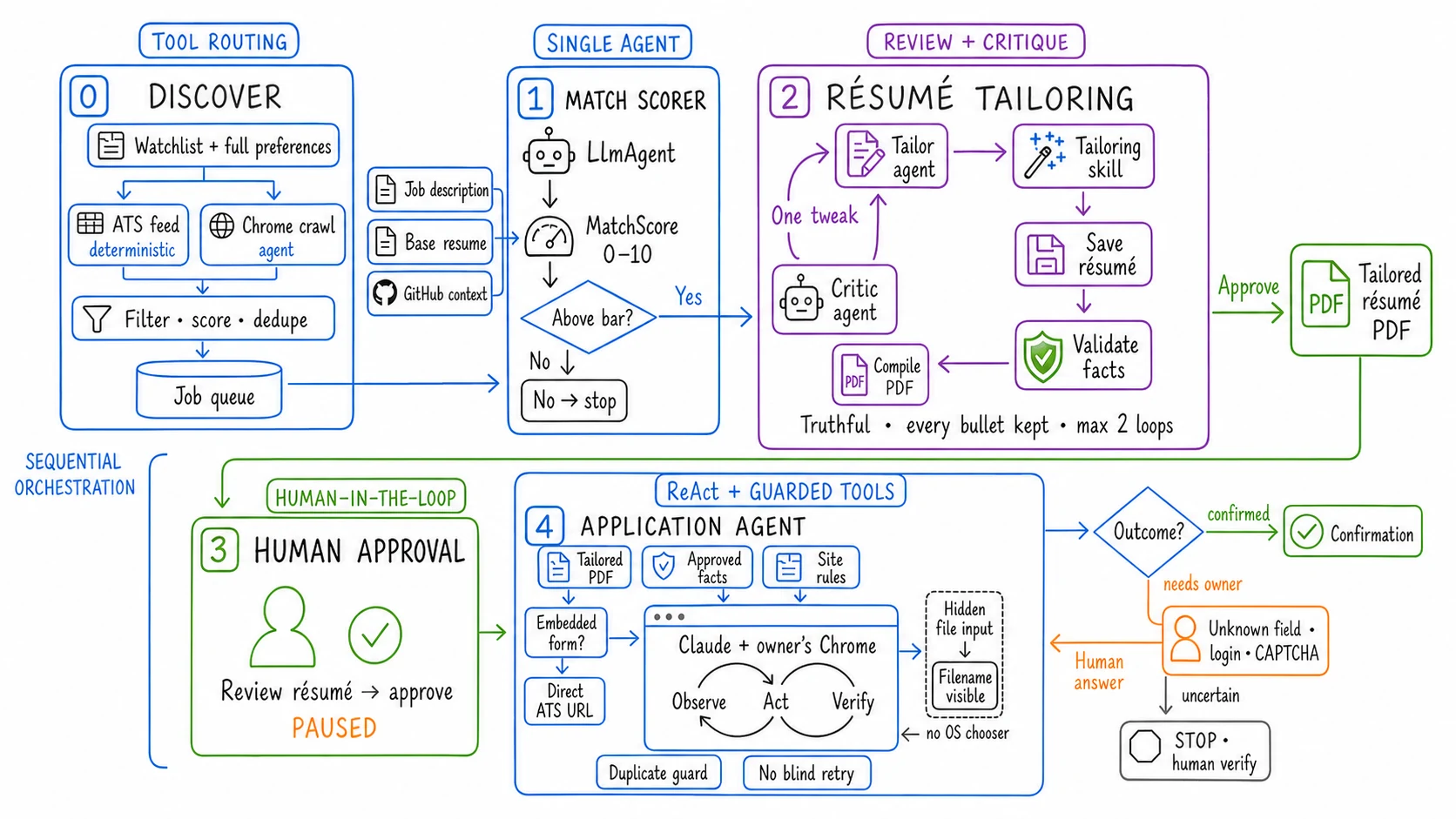
Run it on your machine.
Start with one job link and see a tailored résumé before anything touches a browser.
# clone and install
git clone https://github.com/sayantan94/AppliedIn.git
cd AppliedIn && cp .env.example .env
./appliedin setup

# add your OpenAI key to .env and your résumé to resume/base.tex
./appliedin start --no-discover
What you need
- macOS or Linux, and an OpenAI API key for scoring and résumé tailoring.
- Claude to apply: Claude Code with its Chrome extension, on a Pro, Max, Team or Enterprise plan.
- Your résumé in LaTeX, so it can be tailored and rendered to PDF.
- Codex is optional. Use it instead of Claude for Career Ops web search if you prefer.
Setup installs the rest: Python, Redis, the LaTeX renderer, Git and Node.js.
Before you turn on automatic submission
- Read a few tailored résumés and answered forms first.
- Fill in your application facts, so forms aren't left to guesswork.
- Some companies cap applications per period. Pick roles you actually want.